
You may know about executors, either from your own estate plans or perhaps because you have been named an executor on the will of another. However, a digital executor is a separate entity, of increasing importance in modern society. At the very least, this is due to having a social media presence of some kind. However, as we increasingly have more and more electronic assets, like financial accounts and cloud storage, designating a digital executor is increasingly important. You can’t simply provide a list of account passwords.
Defining a digital executor, both in our will as well as with platform tools, is important to us for two reasons. First, we’d like our digital executor to have the tools at their fingertips to mechanically access our accounts as needed. Second, we want to provide legal cover as best as we can, to our digital executor.
At the moment this seems to be an evolving area. It’s not entirely clear if a family member with access to usernames/passwords has the legal right to actually access our accounts when we pass. Nor is it clear that an executor can do so by default, without also being named as digital executor. So, to the extent that we can express our wishes in our will AND use the tools available to effectuate this, we are trying to do so.
The Big Guys - Microsoft OneDrive, Google, Meta, Apple
As of June 2026 each of the big guys provide options for a digital executor to take some level of control over accounts. Some allow you to post a final notice (Meta), others allow you access to files and photos stored in the cloud. Finding and configuring these settings often takes a bit of work. Outside of the big guys, it would appear most online platforms at best haven’t thought to provide a mechanism, or at worst simply are ignoring it.

Microsoft (OneDrive) - Digital Legacy
Microsoft provides a relatively easy mechanism they named Digital Legacy under settings. It allows for one single contact to access your files when you pass. You must, ahead of time, add the contact, get a code, and provide that code to your contact. When you pass they can request access and be granted access 72 hours after providing the code.
Note that as of June 2026 you can’t find Digital Legacy in the options when using a mobile device (Android at least). It had to be configured with a desktop/laptop browser.
Google - Digital Legacy
The engineers at Google should be given kudos as they seem to have actually thought this process through. You can provide access to up to 10 people. Again, add them in advance, but then you configure settings by which Google sends you notices after a period of inactivity. After you fail to respond to these notices and another configurable period passes, Google notifies your legacy contacts for them to take action. Configure this at https://myaccount.google.com/inactive
Meta (Facebook & Instagram) - Memorialization
While Google did a stellar job, Meta seems to have done the absolute bare minimum. It’s hard to find the function to set. First, it’s called “Memorialization” – not exactly something that springs to mind. Directions from an online search all seem to be wrong. Finally, it only allows one contact AND they must be invited via Facebook Messenger. Ugh. As this always seems to be changing, search for memorialization and Meta to figure out the current process.
Apple (iCloud) - Legacy Contact
Finally we have Apple. They are probably somewhere between Meta and Microsoft. They certainly added a lot of friction. You have to designate a Legacy Contact and provide that contact with an access key. You can’t do this via the iCloud website. Instead you MUST do this on a physical Apple product.
You can have multiple Legacy Contacts and supposedly they don’t need to have an Apple product. But the Apple documentation ALSO claims you must be connected with iMessenger which generally requires an Apple product so your mileage may vary.
Finally, on death, the Legacy Contact needs to present both the key you’ve provided AND a death certificate. I think the security hats won out over the usability hats within the company.
Passwords (and other sensitive information)
As we all know, we have tons of logins, and some are more important than others. Financial, utility, even on-line repositories for estate plans all have usernames and passwords. Hopefully, you have different passwords for each website at a minimum. Ideally, you don’t have scraps of paper sitting around with usernames/passwords written on them. In our case, as long term travelers, with no fixed home base, we’ve got to use password managers.
When it comes to defining a Digital Executor, this seems to be a common theme – use a password manager, name your Digital Executor as someone who can have access to the passwords therein, and where possible, use the platform tools provided.
Many password managers provide this capacity like 1Password, Bitwarden, Proton Pass, Dashlane, LastPass, and NordPass. This capability is crucial for us as a mechanism to provide both passwords and store, encrypted, sensitive documents and information.
Websites and Domain Names
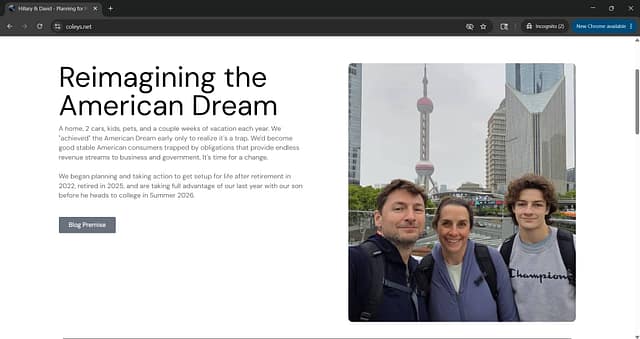
Depending on your particular situation, you may also find yourself with your own websites and domain names. In our case we own a domain name (coleys.net) and manage domain name records for it. We also have a blog (which you are reading), built on WordPress residing with a different provider, that also provides email hosting. Our own email is hosted on this site, but so is email for our (soon to be adult) son.
Unfortunately, neither our domain name provider nor our hosting provider offer specific digital executor or legacy mechanisms in their platform. Given the importance (to us) of the domain and the email hosting, we are both using a password manager that our digital executor has access to, and explicitly naming our domain and hosting platform in our will. Again, this may be overkill but it’s an attempt to be explicit in the ownership transfer when we pass.
Don't Forget Your Digital Executor
Regardless if you are a slow traveler or not, having a digital executor defined is very important in the modern estate planning process. Simply giving a list of usernames and passwords may not provide sufficient legal cover for your loved ones.
We’ve chosen to explicitly name our Digital Executor in our will. However, we have also sought to take advantage of any digital legacy, memorialization, or other feature provided by service providers. And, we’ve also made sure to use the digital legacy function available in our password manager.
This post is part of a larger series covering our approach to getting our affairs together and estate planning ahead of a long adventure in slow travel around the world. Read more background on this series or jump to other topics in the series.